Dream PC Prize Description & Estimated Retail Value
OFficial video
System Components
* GIGABYTE 3D Mercury GZ-FW1CA-AJS Silver Aluminum ATX Full Tower Computer Case - $399
* Custom Case Painting by Gary Berg - $1500
* Ultra X3 1600 watt Power Supply - $469.99
* 1 Intel Core 2 Extreme QX9650 Processor - $1014
* eVGA 790i Motherboard - $369
* Corsair XMS3 2x2GB DDR3 1600MHz memory kits (total 8GB) - $736.80
* 2 EVGA GeForce 9800 GX2 Video Cards - $1199.98
* 2 OCZ 64GB internal solid state disks (SSD) - $2,180
* Adaptec RAID 3405 adapter card - $390
* 4 Cheetah 15K.5 SAS 3Gb/s 300-GB Hard Drives - ST3300655SS - $3,931.20
* Western Digital WD7500AAKS 750GB Caviar SE16 hard drives - $398.98
* 2 Sony BWU200 Blu-Ray Read/Write Drives - 1199.98
* Ultra Internal 3.5" Floppy Drive w/Multi Card Reader Black - $29.99
* Cables Unlimited UV Reactive Mode Kit with Dual Tube UV CCFL Lights, Fans, Floppy Cable and ATA133 Cable - $26.99
* Vantec UV Reactive Motherboard Slot Protector - Green - $4.99 (PCIe)
* Hauppauge WinTV-HVR-1800 PCIe NTSC/ATSC/QAM tuner - $149
* Emu 1616M PCI Sound card and breakout box (studio quality inputs and A/D, D/A, surround via digital) - $599
Display
* 3 NEC LCD2490WUXi-BK 24.1" Widescreen LCD Monitor - $3,866.97
* Ergotron monitor mounting system (3 wall mounts and 3 desk mounts) - $1014
External Peripherals and Components
* Iomega UltraMax Pro eSATA 1.5TB - $504
* APC Back-UPS RS 1500VA LCD - 249.95
* Logitech diNovo Edge Keyboard - $199.99
* Logitech MX AirTM Rechargeable Cordless Air Mouse - $149.99
* Logitech Z-5500 THX Certified 5.1 500-watt Dolby Digital & DTS Hardware Decoding Speaker System - 209.99
* Canon Pixma MP970 Printer - $299.99
* Icemat Siberia Headphones/mic - $79
* Saitek X2 Flight control system - $119.95
* Xbox 360 Gamepad controller - $39.95
Software
* Microsoft Office Ultimate 2007 - $620.99
* Microsoft Windows Vista Ultimate 64 - $379
* Microsoft Windows XP SP2 - $249.99
* Adobe Master Collection CS3 - $2,750.99
* EA Crysis - $49.99
* Microsoft Flight Simulator X Deluxe - $59.99
* Call of Duty 4 - $59.99
* Half Life 2: Orange Box - $61.99
* Battlefield 2142 Deluxe Edition - $30.99
* Kaspersky Internet Security 7.0 - 73.99
* System Commander 9 - $69.95
* Acronis True Image Home $49.95
* Easy Media Creator 10 - $99
* Cyberlink HD Suite Ultra - $129
* Power DVD Ultra - $99
Miscellaneous
* OCZ Freeze Thermal Compound - $5.99
* Labor for building and troubleshooting -- 100 hrs at $50/hr - $5,000
TOTAL ESTIMATED RETAIL VALUE: $31,123.52

One of the things that Apple has always prided itself over and promoted in no uncertain terms, has been the so-called 'robust security' offered by its OSX operating system. However this supposition of Apple's took a huge beating on Thursday when a team of researchers from Independent Security Evaluators (ISE) managed to hack a MacBook Air in just two minutes using a previously unknown security vulnerability in Apple’s own safari browser.
The people who did the 'hack' were ISE security researchers - Charlie Miller, Jake Honoroff, and Mark Daniel – who were participating in the "PWN to OWN" competition at the CanSecWest security conference, in Vancouver, British Columbia.
In this competition there were 3 laptops, with different OS’s offered for being hacked into. These included an Apple Macbook Air running OS X 10.5.2, a Sony Vaio VGN-TZ37CN running Ubuntu 7.10 and a Fujitsu U810 running Vista Ultimate SP1. Anyone who could successfully hack or exploit these machines would win a $10,000 price from famous security company Tipping Point.
The first to go was of course the Macbook, followed by Windows Vista. Ubuntu stood strong despite repeated attempts.
For further details on this hack, check out this post here on Tipping Point.

Dell is offering a Blu-ray laptop, the Inspiron 1525, for under $1000.
Available from today on dell.com, movie buffs can pick up the laptop with optional Blu-ray disc playback starting at $879.
The Inspiron 1525 laptop features a 15.4-inch high definition wide aspect display with 720p resolution. It also includes an HDMI port for easy connectivity to high resolution displays and HDTVs.
The Blu-ray player disc drive is fully backwards compatible, and will play as well as burn traditional DVDs and CDs. Consumers can also choose a Blu-ray burner drive for backing up and storing important files like digital photos, videos, financial records, etc. A Blu-ray disc can hold up to 50 GB of data, vs. 8.5 GB available on the typical DVD disc.
The Inspiron 1525 offers designs like Chill, Blossom and Commotion, in colors like Sunshine Yellow, Midnight Blue and Ruby Red.
Dell Inspiron 1525 laptops with Blu-ray disc drives incorporate Broadcom Media PC technology that allows PCs with integrated graphics to play high definition video. The high-definition video playback is enabled through a built-in dedicated accelerator located in a mini-card slot.
The Inspiron 1525 features Dell MediaDirect technology, which provides one button instant access to media files, even if the system is powered off or in hibernation mode. Optional accessories include a slim travel power adapter ($80), Dell travel remote control that slips into the ExpressCard slot ($22), and Creative noise-isolation earphones ($25).
As of now the Inspiron 1525 laptop with Blu-ray is in the U.S., Canada and Europe, but let's hope with the tie-up with Croma we get to see this laptop here pretty soon.

Thrilling realtime battles in ancient Greece
„Fate of Hellas“ is an RTS game, which takes the player to ancient Greece: 2500 Years ago, before the rise of Rome, fierce battles between the Greeks and their enemies took place.
Be part of great battles, fought with honor!
* Thrilling realtime battles in ancient Greece
„Fate of Hellas“ is an RTS game, which takes the player to ancient Greece: 2500 Years ago, before the rise of Rome, fierce battles between the Greeks and their enemies took place.
* Build formations with your troops
3 different formations for strategic fights!
* Equip your troops with weapons from your defeated enemies
Pick up the weapons left behind by your enemies after you have killed them in combat
* Besiege the citys of historic Greece!
The more cities you conquer, the greater your power on the battlefield
* More than 60 different characters!
Different fighters, buildings, vehicles and many more.
Minimum System Requirements
OS: Windows 98, 2000, ME, XP or Vista
CPU Type: 2.4 GHz CPU
Memory: 1024 MB RAM
Diskspace: 4 GB
Graphic-Cards: NVIDIA GeForce 6 Series, ATI Radeon 8500, or similar 3D Cards
Recommended System Requirements
CPU Type: 3 GHz CPU
Memory: 2048 GB RAM
Graphic-Cards: NVIDIA GeForce FX 7 Series, ATI Radeon 9 Serie, or similar 3D Cards
RElease date:
Germany, Austria, Switzerland
27.03.2008
UK
27.03.2008

Remember 50 Cent: Bulletproof? Remember how much that game sucked? Yeah well apparently it sold really well so Vivendi Universal are back with a sequel called 50 Cent: Blood on the Sand.
By Blood on the Sand they don’t mean the sand of a beach resort cos that would be way too mellow for Fiddy and his band of badass thugs AKA Gggggg G unit. This time around these player haters actually find themselves stuck in a war torn unnamed Middle Eastern country after one of their concerts gets fudged. As expected tons of F Bombs, rapping, bling and terrorist killing ensue.
The game is being developed by Swordfish Studios (Cold Winter) using the Unreal 3 engine and will include a bullet time mechanic called Gangster Fire that as the name suggests will allow Fiddy to blast fools in glorious slow motion. Also expect a cover system a la Gears of War and context sensitive games a la God of War. More details to be revealed soon.
The first thing to notice when you join a private BitTorrent site is the eye-popping quality of the torrents. Each one is carefully culled, hand-picked through a strict moderation process. However, before you start hammering away on that download link - here are a few things you need to know.
On private torrent sites, everything revolves around ratios. A 1:1 ratio (or 1.0) means that you’ve downloaded exactly the same amount of data as you’ve uploaded. Thus a 0.80 ratio indicates that you’ve uploaded less than you’ve downloaded, which is hurtful to the health of the torrent. Inversely, a 3.0 ratio means you’ve uploaded 3 times more data than you’ve downloaded. Strive to achieve at least a 1.0 ratio - each site will have specific consequences for members who maintain a ratio of less than this. Attain a ratio over 1.0 and the rewards shall follow you into the P2P afterlife.
If you’re brand-new to a private site, it will be difficult in the beginning to acquire a 1.0 ratio. Luckily, users are given a ‘grace’ period to achieve this. Since there are so many more seeds than leechers (a total flip-flop from public BT sites), it becomes harder to upload to others - due to the fact that there are fewer people to share with.
So why go through all the trouble to keep an honest ratio? Because deep down, you’re an upstanding denizen of file-sharing society! Aside from that shameless pat-on-the-back, good ratios offer many perks, including an upgraded account on the tracker (i.e. VIP status), higher download speeds, free “invites” for your friends, and no waiting periods associated with accounts in arrears.
Here are Ten Tips to get your ratio in top-shape as fast as possible:
1. Start out with Smaller Files
Initially, opt for smaller (i.e. under 1 GB) files for downloading. This gives you a greater chance of someone coming along after you and downloading the same torrent (and you’ll be able to upload to them). Obviously a 700MB movie file will be more appealing to other site members than a 30GB ‘Blu-Ray’ rip.
2. Jump on the ‘Newly Released’ torrents
This is a great tip for increasing your ratio in a hurry. Camp out in your favorite private BT site, and refresh the torrent listings frequently. Newly added entries will have many more leechers than seeds, so you’ll be able to share (upload) more data. To maximize this tip, select smaller files - the “TV Episode” category works great for this.
3. Select Files that have a High ‘L’ or upload number
This is important. When selecting torrents, base your initial selections on a high number of leechers (the more, the better). This will ensure you have many avenues to upload to during (and after) the transfer. When starting out on a new private BT site, we would even go so far as to say that you should download torrents that you don’t want - just start grabbing torrents that have lots of leechers. Once your ratio get over the 1:1 (1.0) mark, delete them.
TIP: If one of your seeding torrents remains popular, leave it running in µtorrent permanently. This will always help to boost your upload ratio.
4. Avoid ‘Zero-Leech’ torrents
When you’re new to a private site, steer clear of the ‘zero-leech’ torrents - it is impossible to increase your share ratio when there are no other downloaders. When viewing a list of torrents, look for the “Leecher” column (or just “L”) and avoid anything that has a zero ( “0″ ) in it. After your account ratio has become relatively stable, now is the time to snag whatever you want.
5. Leave some tasks running in uTorrent
After the completed download of a torrent, leave the task running (as a seed) in µtorrent to increase your upload statistics. Don’t delete (or move) the files of a running task! You can, however, extract (unRAR) the files, or copy the files from one place to the next. In the event of a movie/video file - you’ll be able to “burn” or “extract” the *.avi file (or even play it on the PC) without affecting the seeding torrent.
TIP: Always keep a few things running as ’seeds’ in your BT client. If you notice that they aren’t uploading, replace them with newer ones.
6. Go for the ‘Freebie’ downloads
Many private sites will offer “free” torrents that won’t count against your download statistics (thus, your ratio will remain unchanged). Grab these freebies - especially when searching for torrents on a new account.
7. Use ‘Credits’ to purchase…
A popular feature among superior private BitTorrent sites is the addition of a ‘credits’ feature for account holders. Credits can be used to ‘purchase’ VIP status, increased sharing ratios and other perks. Not all sites are the same, but some credits can be acquired just from staying active in their IRC channel, or from just having the torrents available for download in your BT client.
8. Do NOT try to ‘cheat’ the Private Trackers
There are a variety of ratio cheating tips available out there, but don’t be tempted. Trackers are fairly sophisticated and ever-evolving. If you get caught cheating, you won’t even be warned - it’s a permanent ban for you and bye-bye for good.
9. Set a proper Upload Limit
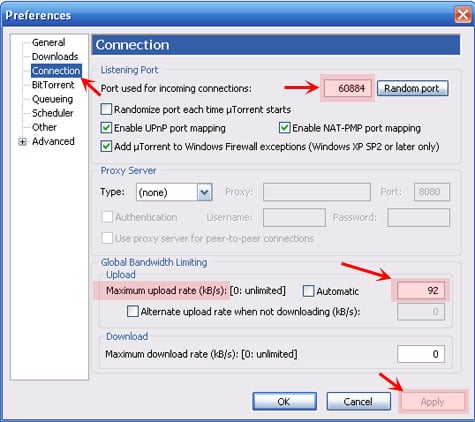
Setting a proper upload limit in the BT client makes all the difference! You’ll want to supply a high enough limit to maximize uploading, but not have it eat into your download bandwidth. The general rule is to set it at 80 - 85% of your upload limit. To figure this out, visit www.speedtest.net and conduct the simple test. Results are shown in kilobits, so divide the result by 1/8 and then multiply that by 0.85. This will give you the proper number in KB/s (KiloBytes).
In µtorrent, go to OPTIONS > Preferences… > Connection and enter your upload rate. Click “Apply” and then “OK” to save the changes. While your in that same ’settings’ page, make sure to use a port number from the good list (e.g. 49152 - 65535).
10. And if all else fails…donate
Most sites allow for monetary contributions to keep up with the server costs. If you enjoy a particular site immensely but cannot seem to be able to approach a decent sharing ratio (due to turning off your computer at night, going to work, or sharing your computer with your kids, wife, husband or siblings), think about donating. In most cases even a not-so-generous gratuity will robustly affect your account status - plus you’ll feel good about helping out the BitTorrent community.
Other Tips - Follow ‘The Rules’
Yeah, we know: you hate rules! That’s why you probably moved out of your parents’ basement. Rules are probably why some turned to P2P.
Nevertheless, rules are an important aspect to private BT sites - they ensure healthy torrents and blazing-fast download speeds for all. Each site will have their “rules” posted - the link is usually not hard to find. Below are some general rules / tips that pertain to any private BitTorrent site:
Use an ‘Accepted’ BitTorrent client
Not all private trackers are the same - and each one has different rules in regards to which BitTorrent client is on the “allowable” list. Most sites recommend µtorrent, but only specific versions (or builds) of it. If you stick with v1.6.1 or the latest version v1.7.7 (recommended), you can’t go wrong with ANY private site (avoid any versions in between these numbers). And do not use BitComet on private trackers.
Proper BitTorrent client configuration:
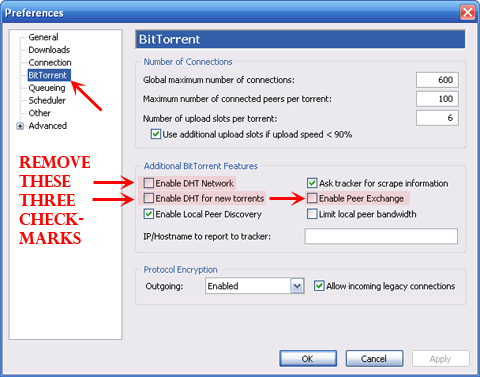
Many trackers recommend that you disable DHT and Peer Exchange (PEX) in your BT client’s settings. To do this in µtorrent, go to OPTIONS > Preferences… > and select the BitTorrent tab. Remove the three checkmarks that pertain to DHT and PEX (see image below):
Do not ‘Hit & Run’ a Private BT site:
A ‘Hit & Run’ (or H&R) is when someone joins a private tracker, and downloads as much as they can before making off without uploading to a proper ratio. While this practice is frowned upon even on public sites such as mininova.org, it is deplorable to private sites. This can (and sometimes will) lead to your IP address being banned from the site - forever.
Stick within these guidelines for HAPPY Torrenting!

Mobile TV is definitely going to be the wave of the future. And it seems like India’s own, Spice Telecom is gearing up to launch content for the Mobile TV generation. What Spice is planning on doing is providing content (user-generated) for users to download onto their devices from a given portal they would create. The content according to the site - Telecom Tiger would include clippings form popular Indian TV shows, movies and possibly even music videos perhaps.
Spice has also apparently tied up with BBC World and CNN for news and hopefully we would also see content from other popular channels like Cartoon Network etc. I know I’d be looking forward to watching a few toons on my mobile.
-ty to Shayne Rana
Those looking forward to GeForce 8200 paired with another GPU will have to wait a tad longer
NVIDIA representatives notified its board partners this week that its new Hybrid SLI technology has been delayed. NVIDIA's Hybrid SLI technology offers an innovative new method to improve power management and performance. However, motherboard vendors will have to wait to implement the new NVIDIA feature.
The basics of Hybrid SLI aren't very difficult to understand. The term itself envelopes two different NVIDIA technologies, GeForce Boost and HybridPower. GeForce Boost allows for a single discrete NVIDIA graphics card to be paired with an NVIDIA motherboard's integrated graphics. HybridPower, on the other hand, dynamically throttles the discrete graphics adapter as needed.
The delay notification reads, "We are still experiencing delays in getting the kits sent as the product is experiencing delays, drivers are being fine-tuned and sales tools are being finalized."
NVIDIA goes on to promise that Hybrid SLI samples will reach vendors in the second half of April, which means retail availability has been pushed into late May. The company does not state the reason for the delay.
Cards that currently support Hybrid SLI include the GeForce 8500 GT as well as the GeForce 8400 GS. The chipsets that support Hybrid SLI include the NVIDIA nForce 720a and the nForce 730a.
-thanks Gabriel Ikram

XFX today introduced the XFX NVIDIA GeForce 9800 GX2-based graphics card. The new card combines the power of two GeForce 9800 GPUs into a single graphics solution. Featuring NVIDIA HybridPower technology, 256 screaming fast stream processors and a 1GB framebuffer, it clocks in at up to 50 percent faster across games as compared to the GeForce 8800 Ultra.
The 9800 GX2’s dual-GPU design enables smooth game play at resolutions of up to 2560 x 1600, even with all available in-game features turned on. It is also designed for the new PCI Express 2.0 bus architecture, offering the highest data transfer speeds for the most bandwidth-hungry games and 3D applications, while maintaining backwards compatibility with existing PCI Express motherboards for the broadest support.
The 9800 GX2 graphics card utilizes a second generation NVIDIA PureVideo HD technology engine for an unsurpassed home theater experience. Users experience unprecedented HD picture clarity, smooth video, accurate color and precise image scaling for movies or video. PureVideo is a discrete programmable processing core that provides ultra smooth movies with 100 percent of H.264 video decoding from the CPU with significantly reduced power consumption.
Also being released at the same time is the new nForce 790 SLI motherboard, which is the only platform that supports DDR3 SLITM-Ready memory with EPP 2.0 and provides world-record setting memory speeds up to 2GHz. With a 1600 MHz FSB the XFX’s 790i Ultra SLI motherboard is also capable of three-way SLI.
The 9800GX2 graphics card and 790i Ultra motherboard are available with Rashi Peripherals and its nationwide branches across India at an estimated street price of Rs. 45,999 and Rs. 22,999 along with 3 and 2 years warranty respectively.

 Posts
Posts

